 ShipShield
Ship your AI-built app. Not your users' data.
ShipShield helps non-coders find the security holes vibe-coded apps are known for (open databases, exposed API keys, paywalls anyone can skip) and fix them with copy-paste prompts for Lovable, Bolt, Replit, Cursor and v0.
Issues found
profilesCRITICALA2 · owner-only RLS
curl returns []
Works with apps built on
LovableBoltReplitCursorv0+ Supabase & Firebase“It works” isn't the same as “it's safe.”
AI builders make shipping easy. Locking down who can read your database is still on you, and researchers keep finding the same mistakes.
Lovable-built sites sent Supabase database records the moment they loaded, with no login (out of 34,545 using Supabase, in 159,041 projects analysed).
Crissy Field, Nov 2026 ↗of those sites had tables with records containing email addresses that researchers could read using extra read-only requests.
Crissy Field, Nov 2026 ↗API tokens and 35,000 email addresses were exposed by one vibe-coded app's misconfigured Supabase database (Moltbook).
Wiz Research, Feb 2026 ↗of 1,645 Lovable projects scanned had inadequate Row Level Security, exposing data (CVE-2025-48757).
Matt Palmer, May 2025 ↗Crissy Field notes that some records may be public contact or test data, so the 7,403 figure isn't a confirmed leak rate; their sample came from Common Crawl and isn't representative of every Lovable app. Figures are quoted as published by each source.

Wiz Research on Moltbook, Feb 2026
The quiet ways AI-built apps get burned
None of these show up when you click around your own app. All of them show up when a stranger opens DevTools.
- 🗄️An open databaseThe public Supabase key plus missing or loose RLS means anyone can read (or write) your tables.
- 🔑Secret keys in the browserA
VITE_orNEXT_PUBLIC_variable ships your OpenAI or Stripe key to every visitor. - 💳A paywall anyone can skipIn CVE-2025-48757, a researcher inserted a record with
payment_status: "paid", bypassing Stripe. - 🔥A surprise API billNo rate limits and no budget cap on your AI endpoints means one script can burn your credits overnight.
Your pre-launch security checklist, plus the exact prompts to fix every gap
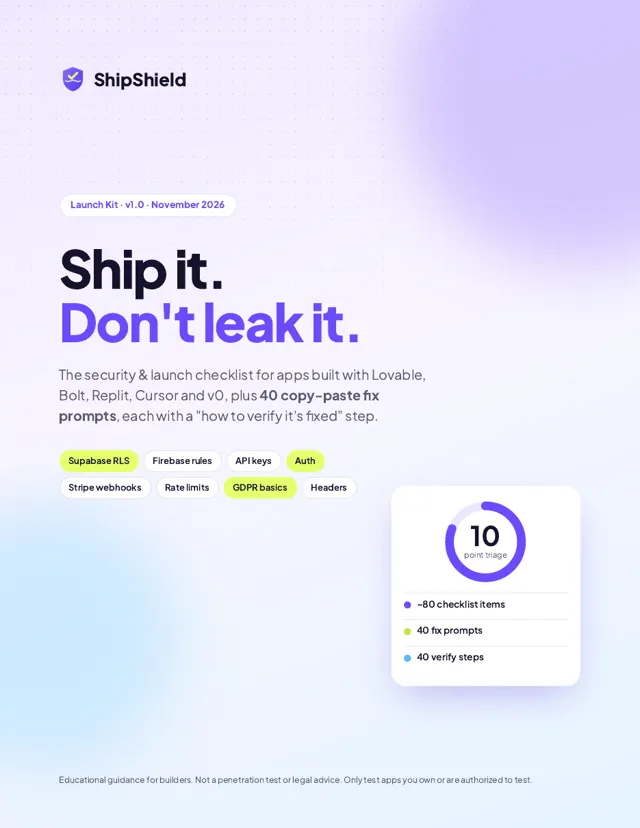
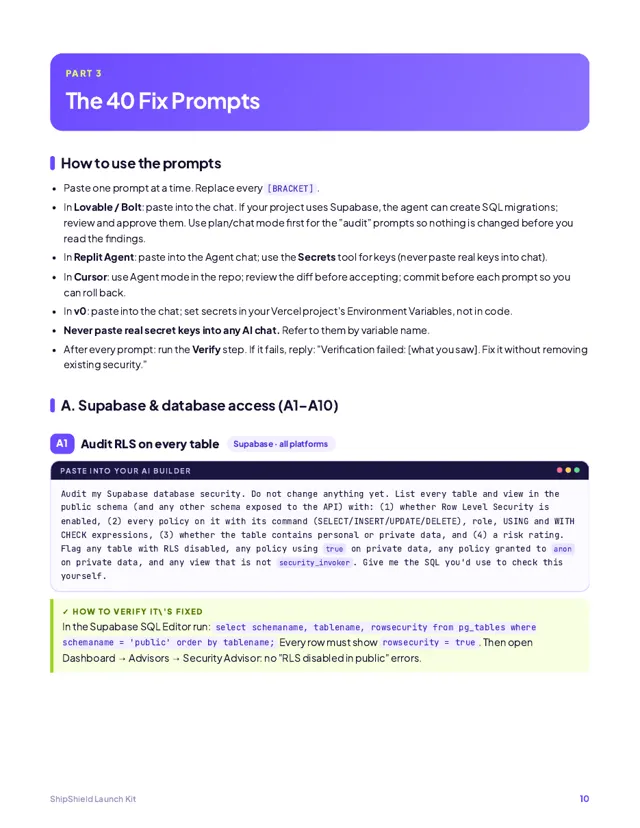
A designed 26-page PDF written for people who build with AI, not security engineers. Paste a prompt, then run the “verify” step to prove it worked.
Supabase & RLS
Owner-only policies, protected role and plan columns, views, RPC functions and storage buckets. 10 prompts.
Firebase rules
Replace test-mode rules, validate writes, lock down Storage and Realtime Database, add App Check. 5 prompts.
Secrets & API keys
Find keys in your bundle, move AI calls server-side, clean Git history, rotate what leaked. 6 prompts.
Auth & access
Endpoint inventory, IDOR fixes, server-side admin checks, paywall enforcement, Next.js server actions. 6 prompts.
Stripe payments
Webhook signatures, fulfilment from webhooks, idempotency, cancellations, server-side prices. 4 prompts.
Abuse & costs
Per-user rate limits, AI budget caps, Turnstile CAPTCHA, prompt-injection guardrails. 4 prompts.
Input & uploads
Server-side validation, XSS clean-up and safe file uploads. 3 prompts.
Headers & backups
Security headers, exposed /.env and /.git checks, and backups you can actually restore. 2 prompts.
Privacy & leak plan
GDPR basics in plain English, plus a first-hour plan for when something leaks.
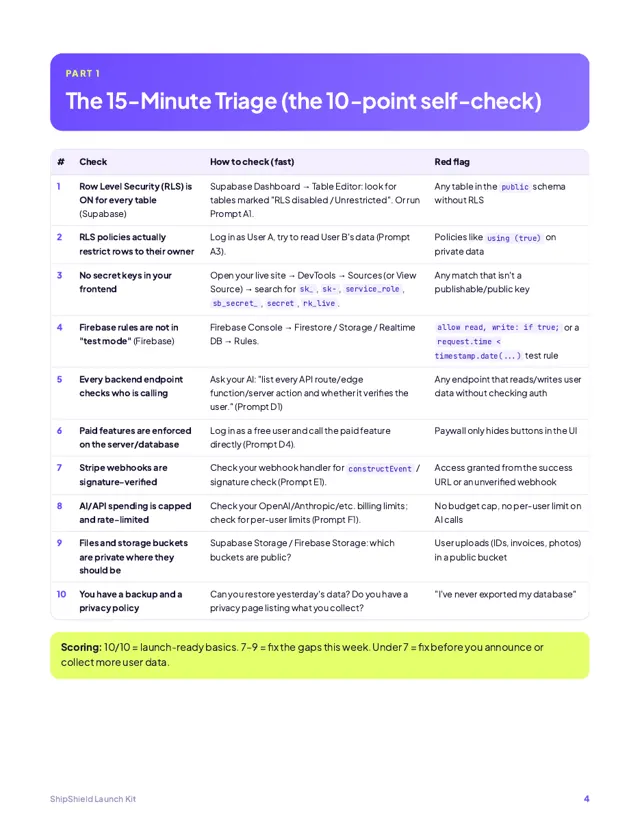
The 10-point self-check
The ten checks behind most public leaks of AI-built apps. Tick what's true for your app. Your answers stay in your browser.
Missing a few? The Launch Kit has a fix prompt and a verify step for every one.

Rather have a human check it for you?
We review your live app the way an attacker would, with your written permission, and send you a plain-English report with a copy-paste fix prompt for every finding. Delivered within 48 hours.
- Book and authorizeAt checkout, enter your app URL and confirm you own the app and authorize testing.
- We email you within 24 hoursFrom support@shipshield.app, to collect test accounts and any access you choose to share.
- Get your report within 48 hoursFindings ranked by severity, why each matters, and a fix prompt + verify step for each.
Founding rate for our first clients. Not a penetration test. We only ever test apps whose owners have authorized it.
Pick your level of lockdown
No subscriptions. Pay once, keep it.
ShipShield Launch Kit
Do it yourself, guided step by step.
- 26-page designed PDF, instant download
- 15-minute, 10-point triage
- ~80-item checklist across 12 areas
- 40 copy-paste fix prompts, grouped by platform and issue
- A “verify it's fixed” step for every prompt
- First-hour leak response plan
14-day money-back guarantee
ShipShield Audit
Done for you, by a human, in 48 hours.
- Review of your live app with your written authorization
- Checks for exposed keys and files, plus security headers
- Database rules and RLS tested with two test accounts
- Auth, paywall and Stripe webhook logic walkthrough
- Plain-English report ranked by severity
- A fix prompt and verify step for every finding
- The Launch Kit included
Full refund if we find nothing actionable
REFUND
Try the kit risk-free.
If the Launch Kit doesn't help you find or fix at least one real issue, email support@shipshield.app within 14 days for a full refund. No forms, no hoops.
Questions, answered
Do I need to know how to code?
No. The kit is written for people who build with AI tools. Every fix is a prompt you paste into your builder, followed by a simple check (often just a click in a dashboard or one copy-paste command) to confirm it worked.
Which tools does it cover?
Apps built with Lovable, Bolt, Replit, Cursor and v0, with Supabase or Firebase backends and Stripe payments. Most checks (secrets, auth, rate limits, headers) apply to any web app.
My builder has a built-in security scan. Isn't that enough?
Run it, it's a good first pass. But automated scans check for common patterns, not whether your rules match your app's logic. In CVE-2025-48757, the researcher noted that Lovable's scanner at the time checked whether an RLS policy existed, not whether it was correct. Crissy Field's Nov 2026 report puts it simply: “Automated checks are no substitute for a professional security assessment.”
Is this a scanner? Will you scan my app?
The kit is a checklist and prompt pack: nothing scans your app. The audit is a human-led review that we only start after you confirm, at checkout, that you own the app and authorize us to test it.
What do you need from me for the audit?
Your live app URL at checkout. Within 24 hours we email you from support@shipshield.app to ask for two test accounts and anything else you choose to share (for example read-only access to your database project or repo for a deeper look). Never send passwords to your main accounts.
Is the audit a penetration test or a guarantee?
No. It's a focused security review of the issues most common in AI-built apps, with clear fixes. It reduces risk; it can't promise your app is unbreakable.
Is this a subscription?
No. Both are one-time payments. The kit is yours to keep and re-use on every app you build.
How do I get the kit after paying?
You're taken straight to the download page after checkout, and Whop emails you a receipt. Lost the link? Email support@shipshield.app with your purchase receipt.
What's your refund policy?
Kit: full refund within 14 days if it didn't help. Audit: full refund if we find nothing actionable, or if we can't start because we can't access the app. Details on the refunds page.
Lock it down in an afternoon, not after a headline.
Start with the free self-check, fix the gaps with the kit, or hand it to us.